

 (516) 271-2958




A dental provider can deliver excellent care and still lose revenue because of a credentialing mistake. An expired license, incomplete application, or incorrect practice address can delay payer approval and disrupt claim payments. The problem is that many of these errors go unnoticed until reimbursement is held up. Here are 10 dental credentialing mistakes every practice should know and how to avoid them.
10 Common Dental Credentialing Mistakes Practices Make
The dental credentialing process requires accurate information, proper documentation, and careful follow-up. If any of these steps is missed, enrollment can stall, and insurance payments can be delayed. Below are the 10 most common mistakes, each paired with some practical steps to fix it.
1.Starting Credentialing Too Late
Dental practices often wait until a new dentist is ready to see patients before starting credentialing. This leaves little time for payer applications, verification, contract review, and follow-up. Each payer has its own requirements and processing timeline; missing information causes delays. A dentist may treat patients, but claims may not be payable at the in-network rate until the effective date is confirmed. This gap delays reimbursement and creates confusion over patient charges and claim submissions.
How to fix it
- Start applications when a hiring decision is confirmed.
- Track each payer’s requirements, submission date, and follow-up deadline.
- Confirm effective dates before billing as in-network.
- Align scheduling and patient communication with approval status.
2.Incomplete or Inaccurate DataSpring/CAQH Profiles
A CAQH profile can become outdated when a dentist changes practice locations, renews a license, or updates malpractice coverage. Payers may find inconsistencies between CAQH records and credentialing applications, leading to clarification requests and delayed approvals. Dentists must also re-attest their CAQH profiles every 120 days to keep their information current. Missing this deadline can affect payer access to updated information and interrupt credentialing reviews.
How to fix it
- Re-attest CAQH profiles every 120 days.
- Update licenses, practice locations, and insurance details promptly.
- Match CAQH information with DataSpring and payer applications.
- Track profile updates, document expiry dates, and submission deadlines.
3.Missing or Expired Supporting Documents
Dental credentialing applications can stall when supporting documents are missing, expired, or inconsistent with payer records. An active dental license alone is not enough. Payers may also require malpractice insurance certificates, board certifications, updated CVs, W-9 forms, and practice ownership details. A common mistake is submitting an insurance certificate without checking its coverage dates or using an outdated CV that does not match the application. These gaps can trigger additional document requests, repeat verification, and delayed network approval.
How to fix it
- Renew anything expired before you send it to a payer.
- Upload the new copies to DataSpring and the payer portal.
- Reply quickly whenever a payer asks for another document.
- Note what you sent, where it went, and on which date.
4.Inconsistent Data Entry Across Payer Applications
Insurance companies compare the information on your application with other records, such as the dentist’s license, NPI record, and CAQH profile. If the details do not match, the payer may delay or reject the application. For example, a dentist’s name may appear differently on two forms, a practice address may be missing a suite number, or the billing address may be entered instead of the service address.
How to fix it
- Compare the application with the license, NPI, and tax records.
- Pick one correct version of each name and address.
- Update every system that still shows the wrong details.
- Send the corrections to each affected payer in writing.
5.NPI and TIN Data Entry Errors
Incorrect NPI or TIN information can prevent payers from matching a dentist's credentialing application with the correct provider and practice records. This commonly happens when a Type 1 individual NPI is confused with a Type 2 organizational NPI or when an application includes the wrong practice TIN. Even a valid NPI can create problems if its registered name, taxonomy, or practice address does not match the submitted application. These discrepancies can trigger verification requests, application rejections, or incorrect payment setup. Dentists must also keep their NPPES records current whenever relevant provider information changes.
How to fix it
- Verify Type 1 and Type 2 NPIs before submitting applications.
- Match legal business names and TINs with IRS records.
- Check NPI taxonomy, addresses, and practice affiliations.
- Reconcile NPPES, CAQH, and payer application details.
6.Selecting the Wrong Taxonomy Code
A taxonomy code is a 10-character code that identifies a healthcare provider’s type and specialty. General dentists and specialists, such as orthodontists, oral surgeons, and pediatric dentists, use different codes from the National Uniform Claim Committee (NUCC) code set.
A dentist can list more than one code in the NPI registry, but one must be marked as primary, and that code may also be required on insurance applications and claims. If the wrong code is selected, the insurance company may list the dentist under the wrong specialty and may apply the wrong payment rules.
How to fix it
- Choose the code that matches how the dentist actually practices.
- Check that code against the current NUCC taxonomy list.
- Update NPPES and mark the correct code as primary.
- Confirm the code each payer expects, and report any change.
7.Overlooking Payer-Specific Requirements
Credentialing requirements differ from payer to payer, and sometimes within the same payer. Delta Dental credentialing, for example, works through independent member companies in different states, so application steps and network options can vary by state. Assuming one application covers every state or network is a quick way to lose time.
Medicaid adds another layer because each state runs its own dental program. A dentist may need to enroll in state Medicaid before joining certain managed care dental plans. Some states require extra checks, and Medicaid providers are generally subject to revalidation at least every five years.
How to fix it
- Ask each payer for its current list of requirements.
- Compare that list against everything you’ve already sent.
- Gather all missing items before you resubmit.
- Send everything together instead of in pieces.
8.Confusing Credentialing With Contracting
Credentialing and contracting are two different steps in dental insurance enrollment. Credentialing checks whether a dentist meets the insurance company’s professional requirements. Contracting involves signing an agreement that explains payment rates, contract terms, and the locations where the dentist can provide in-network services.
Sometimes, practices receive credentialing approval and assume the process is complete. However, the dentist may not yet be linked to the practice’s group contract or all office locations. As a result, claims may be processed as out-of-network, even after credentialing approval.
How to fix it
- Ask the payer for the signed contract and effective date.
- Check that the dentist is linked to your group TIN.
- Make sure every office location is on the agreement.
- Request any missing links in writing and track them.
9.Treating Patients Before the Effective Date
Every approval comes with an effective date, the day the dentist officially joins the network. Claims for visits before that date may be processed as out-of-network or denied completely. Patients may receive bills they didn’t expect.
Some practices count on the payer backdating the approval. Retroactive effective dates depend on each payer’s rules, and many plans don’t allow them. Billing the visits under another dentist’s NPI isn’t a workaround either. It misrepresents who provided the treatment and creates compliance problems.
How to fix it
- Hold claims for that dentist until the effective date is confirmed.
- Get the effective date confirmed by the payer in writing.
- Ask the payer whether denied claims can be reprocessed.
- Follow the payer’s steps to correct and resubmit them.
10.Not Following Up on Pending Applications
Submitting the application is only the first step. Files stall because a document is missing, an email goes unseen, or nobody at the payer has opened the file yet. Without regular check-ins, you can wait weeks without knowing why nothing is happening.
How to fix it
- Call the payer and ask where your application stands.
- Check whether anything is missing from the file.
- Note the date, the rep’s name, and a reference number.
- Follow up every one to two weeks until it’s approved.
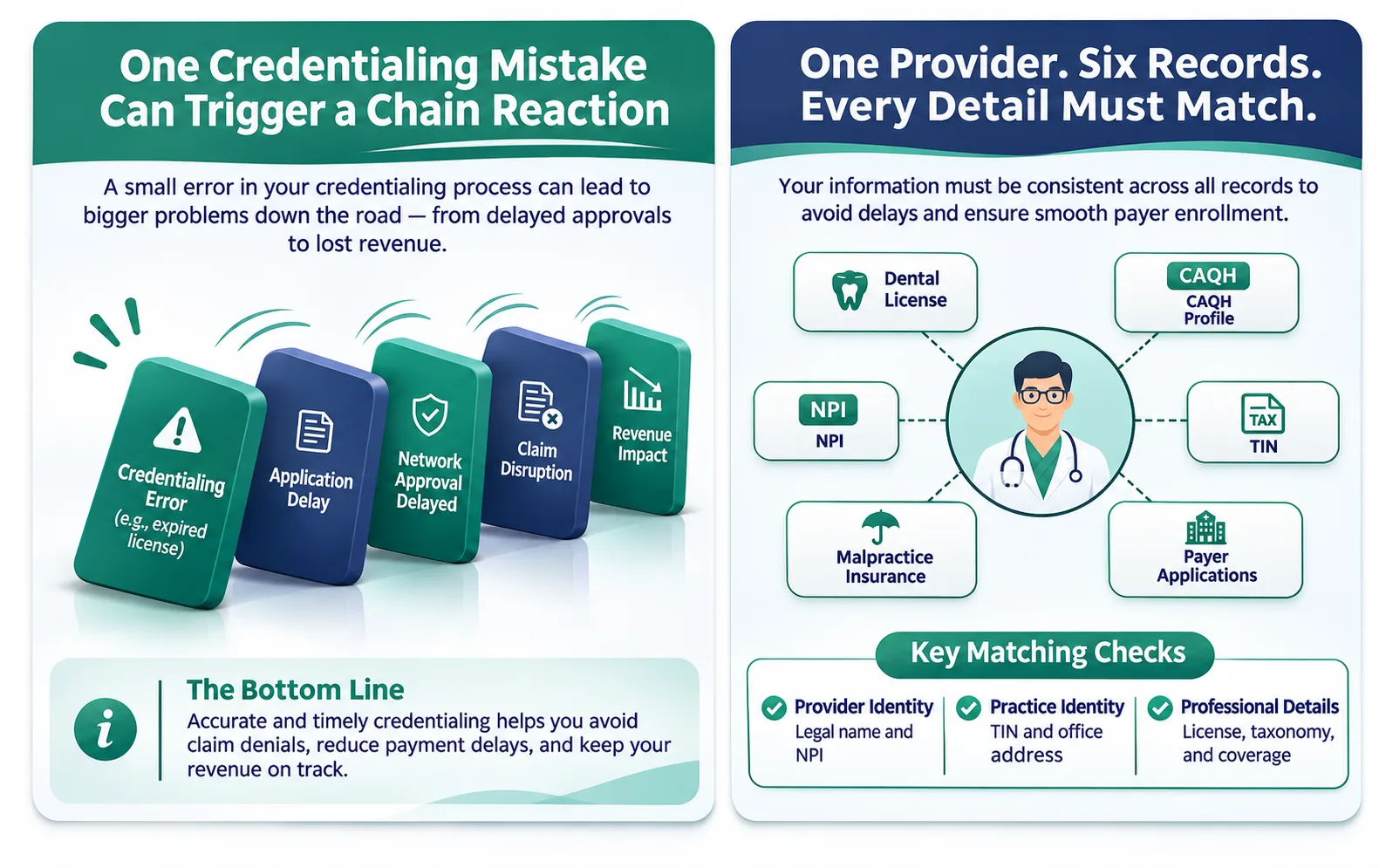
How to Avoid Dental Insurance Credentialing Mistakes
Most credentialing mistakes come down to missed steps, not a lack of effort. These habits may help your team keep applications moving and catch problems before they reach a payer.
- Give one person ownership: Choose a single staff member to handle credentialing for every dentist. When the task is shared across roles, it’s the first thing to slip.
- Build a master provider file: Keep each dentist’s name, addresses, NPI, TIN, taxonomy code, and license details in one place. This is the file you’ll check everything else against.
- Check it, then save a copy: Compare each application to the master file, confirm the DataSpring profile is attested, and review the payer’s current requirements. Keep the full application and submission date so you have proof if a payer says it never arrived.
- Use one shared tracker: Log application status, effective dates, document expiration dates, DataSpring re-attestation dates, and payer recredentialing dates together, and set reminders well ahead of each deadline.
- Report changes right away: When a dentist relocates, opens a new office, changes ownership, or updates their TIN or address, notify all relevant payers and update the DataSpring profile and NPPES records. Request written confirmation from each payer that the changes have been processed.
- Make a follow-up routine: Put payer check-ins on the calendar the day you submit, so no application sits untouched, and write down the next step after every call.
- Review every provider quarterly: A quick look at each dentist’s plans and upcoming expirations catches problems before they turn into denied claims.
For a single-dentist office, this routine is usually manageable in-house. But as you add dentists or locations, the workload can outgrow one person’s time. That’s often when bringing in outside credentialing help makes sense.
When to Hire a Dental Credentialing Specialist?
A dental credentialing specialist can prepare complete applications. They keep your DataSpring or CAQH profile and supporting documents updated, track important deadlines, and follow up with insurance companies regularly.
Signs Your Practice Needs Outside Help
- You have several dentists or multiple office locations.
- Insurance applications are repeatedly rejected or returned.
- You are opening, buying, or changing ownership of a dental practice.
- No team member is responsible for managing credentialing.
- Staff spends too much time contacting insurance companies instead of helping patients.
Conclusion
Although the dental credentialing process involves a lot of work, a few simple steps can help practices manage it more effectively. Keep documents up to date, verify provider details before every submission, follow each payer’s requirements, and track applications until the effective date is confirmed. These practices can help reduce avoidable delays and lower the risk of insurance claim denials for dentists.
Every week an application sits unfinished is another week a dentist can’t bill in-network. If your team is struggling to keep up with new enrollments, revalidations, and payer follow-ups, MedsDental’s credentialing specialists can take over the process and keep each application moving. Talk to our team to get started.